
Losing visibility on one location is damaging. Losing it across several at once is a different problem entirely and requires a different approach.
When multiple GBP listings are suspended simultaneously, most business owners do the same thing: they go straight to the reinstatement form and start submitting appeals. That approach almost always fails. Multiple GBP listings suspended at the same time usually share a common root cause, and submitting appeals before identifying and fixing that cause means every one of those appeals gets reviewed against the same unresolved problem.
This guide covers the correct sequence: how to audit what you have before you touch anything, how to identify whether your suspended listings are legitimate locations or duplicates, why Google suspends multiple listings at the same time, how to clean up correctly, and how to appeal each listing in a way that actually works.
Two rules govern everything that follows: fix the cause before you appeal, and delete duplicates before you appeal anything else.
Get a Free GBP Audit →
Two Situations That Look the Same But Require Different Fixes

Not every case of multiple GBP listings being suspended is the same. Before you take any action, you need to know which situation you are in.
Situation 1: You Have Duplicate or Policy-Violating Listings
This is the most common scenario. A business has accumulated multiple listings, sometimes accidentally, sometimes through a previous agency’s work, for the same location or trading name. Google’s spam detection eventually catches up, flags the duplicates as policy violations, and suspends several or all of them together.
Signs this is your situation:
- More than one listing exists for the same physical address
- Multiple listings share the same phone number, website URL, or business name
- You find listings you did not create yourself
- Previous marketing agencies may have set up listings that were never cleaned up
Situation 2: You Run a Legitimate Multi-Location Business
This situation is less common but more frustrating. A business operating genuinely across multiple separate locations finds that several, or all, of its legitimate GBP listings are suspended at once.
Signs this is your situation:
- Each suspended listing has a distinct, verified address
- Each location operates independently with separate staff and hours
- No duplicates exist across your account
- The suspension happened after a core update, a policy change, or a rapid account-wide edit
The fix for Situation 1 is a cleanup process followed by selective appeals. The fix for Situation 2 is a compliance review followed by bulk appeals with location-specific documentation. Both start with the same first step: a full audit.
Get Expert GBP Advice →
Why Multiple GBP Listings Get Suspended | And Why It Happens All at Once
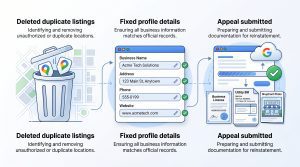 Understanding why multiple GBP listings get suspended together matters because it changes what you fix and in what order.
One Listing’s Violation Can Trigger an Account-Level Review
Google’s Business Profile systems do not always evaluate each listing in isolation. When a violation is detected on one listing, particularly if it appears intentional, such as keyword stuffing in a business name or a fraudulent address, Google’s automated systems can flag the entire account for review. All other listings associated with that account then receive elevated scrutiny.
The result: a single non-compliant listing causes several compliant ones to get caught in the same sweep. This is why business owners with mostly legitimate setups sometimes find multiple listings suspended after only one bad listing was the actual problem.
Shared Signals Across Listings Flag the Whole Account
When several listings share the same phone number, website URL, or business name with keyword additions, Google’s systems read those as coordinated signals of a manipulated profile network. Even if each listing looks acceptable on its own, the pattern across the account triggers action.
Common shared signals that cause multiple GBP listings to get suspended:
- Same tracking phone number used across all locations instead of unique local numbers
- Identical business descriptions are copied and pasted across all listings
- Keyword-stuffed business names applied consistently across every location (“Best Plumber London | 24hr Emergency“)
- All listings point to the same homepage URL instead of individual location pages
Algorithm or Policy Changes That Sweep Entire Categories
Google periodically updates its Business Profile spam policies. When those updates increase enforcement in specific business categories, such as locksmiths, financial services, or legal services, businesses operating legitimately in those categories can find multiple listings suspended simultaneously, even without any recent changes to their own profiles.
This type of suspension is not a reflection of past behaviour but of changed enforcement thresholds. The appeal process is the same, but your documentation needs to demonstrate that your business is genuinely operating in the physical locations you have listed.
Talk to a GBP Expert →
Step 1: Audit Every Suspended Listing Before You Appeal Anything
The single most important rule when multiple GBP listings are suspended: do not submit a single appeal until you have completed a full audit of every listing on your account. Appealing before you understand the full picture means fixing one problem while others remain, and Google reviews everything on the account when processing reinstatement requests.
How to Run Your Audit
- Go to business.google.com and view all listings on your account
- For each suspended listing, record:
- The listed business name (exact)
- The listed address
- The listed phone number
- The website URL attached to the listing
- The primary and secondary categories
- Look for duplicates: same address, same phone number, or same name appearing more than once
- Search Google Maps for your business name to check whether any listings exist that are not in your account (these may be unclaimed duplicates created by users or imported from third-party data)
Classify Each Listing as One of Three Types
Once you have your full list, classify every listing:
- Type A: Legitimate location, compliant:
A real, separately operating location with no policy violations. These will be appealed after all the cleanup is done. - Type B: Legitimate location, with violations:
A real location but with a policy issue, a keyword-stuffed name, an incorrect address, a wrong category, or shared contact details. These need to be fixed before the appeal. - Type C: Duplicate or invalid listing:
A listing that duplicates another location, a listing for a location that no longer operates, or a listing created without a real physical presence. These must be deleted before you appeal anything else.
Step 2: Delete All Type C Listings Before You Appeal Anything Else
This step is where most business owners make a critical mistake. They appeal the listings they care about while the duplicate listings still exist. Google’s review team sees the duplicates during the appeal process and denies reinstatement because the underlying problem, multiple listings for the same location, has not been resolved.
The correct order is: delete duplicates first, fix violations second, appeal third.
How to Delete Duplicate GBP Listings
For listings on your account:
- Go to business.google.com
- Open the duplicate listing
- Select “Remove listing” from the settings menu
- Choose the reason “This is a duplicate” as the accurate option
- Confirm the removal
For listings not on your account (claimed by someone else or unclaimed):
- Find the listing on Google Maps
- Click “Suggest an edit”
- Select “Remove this place”
- Choose “Duplicate of another place”
- Google reviews the request, this can take several days
Wait until all Type C listings are removed or removal is confirmed before moving to the appeal stage.
Step 3: Fix All Policy Violations on Type B Listings
Once duplicates are cleared, correct every violation on your legitimate listings before submitting any appeal.
Most common fixes for multi-location accounts:
- Business name: Remove any keywords, descriptors, or location additions from every listing name. Each listing name must exactly match the name used at that physical location, the name on the shopfront, the lease, and the business registration.
- Phone numbers: Replace shared tracking numbers with unique local phone numbers for each location where possible. If you use tracking numbers, confirm they meet Google’s call tracking policy (the primary displayed number must be a direct local line).
- Website URLs: Each listing should link to a location-specific page on your website, not the generic homepage. Google treats identical URLs across multiple listings as a signal of a listing network rather than distinct businesses.
- Categories: Review the primary and secondary categories on every listing. Remove any categories that do not accurately reflect what that specific location does.
- Addresses: Verify that every address exactly matches the physical location and the business registration document for that site.
Step 4: How to Appeal Multiple Suspended GBP Listings
There is no bulk appeal option in Google Business Profile. You must submit a separate reinstatement request for each suspended listing. This is time-consuming but necessary, Google evaluates each location on its own documentation.
What Documentation to Gather Per Location
Each appeal needs location-specific evidence, not generic company documents. For each location you are appealing to, gather:
- Business registration or licence showing the specific trading name at that address
- Utility bill or lease agreement for that specific location
- Exterior photo of the shopfront showing signage that matches the listing name
- Interior photo showing active operations at that location
- Local phone number confirmation (phone bill or business account statement)
- If applicable: proof that the duplicate listings you deleted were removed (a screenshot of your current account showing only one listing per address)
What to Write in Each Appeal
Use this structure for the explanation field of every reinstatement request:
State what you have done to clean up the account:
“We identified and removed duplicate listings from our account that were associated with this location. A full account audit was completed. This listing is the sole active listing for the required Location on the required address.
State what policy violations have been corrected:
“The business name has been corrected to match our registered trading name exactly: the Name. The previous name included keyword additions that did not reflect our registered business identity and have been removed.”
State why this listing complies with Google’s policies:
“Location Name is a staffed, independently operating premises at the listed address. Supporting documentation, including a business licence, utility bill, and shopfront photos, is attached.”
Keep each appeal factual and specific to that location. Do not use the same generic explanation text across all appeals, Google’s review team reads these, and identical text signals a copy-paste approach rather than a genuine per-location review.
How to Prioritise Which Listings to Appeal First
When multiple GBP listings are suspended, and you have several legitimate locations to appeal, prioritise in this order:
- Highest-revenue or highest-traffic locations first: the locations driving the most customer calls, footfall, and revenue need visibility restored fastest
- Locations with the strongest documentation: an appeal with complete, clean documentation is more likely to be approved quickly; winning the first few appeals builds a positive review pattern on your account
- Locations in your most competitive local markets: a suspended listing in a competitive area causes more damage per day than one in a low-competition market
- Locations with the simplest, most clear-cut violations: complex or ambiguous cases are better submitted after simpler ones are resolved; this avoids a denial on a difficult case, setting a negative pattern early
Space your submissions by at least 24–48 hours between listings if possible. Submitting all appeals within minutes of each other can trigger automated volume flags on your account.
What Happens to Reviews When Multiple GBP Listings Are Suspended
Reviews are not permanently lost when GBP listings are suspended, even across multiple locations.
In a soft suspension (listing still visible, management access removed): reviews remain publicly visible throughout the suspension. You cannot respond to new reviews or flag any for removal while access is suspended.
In a hard suspension (listing removed from Maps and Search): reviews are hidden while the listing is removed. Once reinstatement is confirmed, the full review history for that location is restored.
One exception to be aware of: if a listing was suspended because it was identified as a duplicate of another listing, and both listings had reviews, Google merges the review history when the duplicate is removed. Reviews from the deleted duplicate are typically lost. Reviews on the surviving, properly appealed listing are retained.
This is another reason to audit carefully before deleting: if a duplicate has significant review equity, document this before you remove it, and contact Google Business Profile support to ask about review transfer before deletion.
Recover Your GBP Listings →
How to Structure Multiple GBP Listings to Prevent Future Suspensions
Once your listings are reinstated, the structure of your multi-location account determines whether this happens again.
Each Location Needs Independent, Verifiable Assets
Every listing in a multi-location account should be independently verifiable without referencing any other listing. That means:
- A unique local phone number for each location
- A unique location-specific page on your website for each listing to link to
- A business name that matches the signage and registration at that specific site
- Categories that reflect only what that location does (not a copy of the flagship location’s categories if the services differ)
NAP Consistency Across All Locations
NAP (Name, Address, Phone number) consistency across Google, Bing, Apple Maps, and your website is a stability signal. For multi-location businesses, every location’s NAP must be consistent between the GBP listing and the corresponding location page on your website. Inconsistencies, even small ones like “St.” vs. “Street”, can create flags during automated reviews.
Monthly Account Checks Are Non-Negotiable
Google allows users to suggest edits to any listing, and some of those edits are automatically applied. For multi-location accounts, a user suggestion can change a business name, address, or category on a listing you are not actively monitoring, and that change can trigger a suspension.
Check every listing on your account monthly for unauthorised edits. This takes 15 minutes per account and prevents suspensions that would take weeks to resolve.
How One Digital Creations Handles Multiple GBP Listing Suspensions
When multiple GBP listings are suspended at once, the risk is not just lost search visibility, it is the compounded effect across every location simultaneously. For multi-location businesses, that can mean a measurable drop in calls, foot traffic, and local revenue across all markets at the same time.
At One Digital Creation, multi-location GBP management is a structured service. We run account-wide compliance audits to identify suspension risks before they trigger, manage the triage and appeal process when they do, and maintain the citation consistency across Google, Bing, Apple Maps, and industry directories that gives each location a defensible, stable profile.
If multiple GBP listings on your account are currently suspended, 0203 208857073. We will audit every listing, identify the root cause, and handle the cleanup and appeal process in the correct sequence.
Frequently Asked Questions
Does one suspended GBP listing affect other listings on the same account?
Yes, it can. When Google’s systems detect a policy violation on one listing, they can trigger an account-level review that results in other listings on the same account being flagged or suspended. This is particularly likely when the violation appears intentional or when multiple listings share the same policy-violating elements.
Should I appeal all suspended GBP listings at once or one by one?
One by one, in priority order. There is no bulk appeal option. Submitting all appeals within minutes of each other can trigger automated volume flags. Space submissions by at least 24–48 hours and start with your highest-traffic, best-documented locations.
Can I delete duplicate listings and then appeal the remaining legitimate ones?
Yes, and this is the correct sequence. Delete all duplicates first, wait for removal to be confirmed, then submit appeals for your legitimate listings. Appealing while duplicates still exist almost always results in denial because the underlying violation has not been resolved.
How long does it take to get multiple GBP listings reinstated?
Each listing goes through its own review process, typically taking 3 to 14 business days per listing for straightforward cases. Multiple listings do not get reviewed simultaneously in one batch. Your full account recovery can take several weeks if you have many locations to work through.
What if some listings get reinstated and others keep getting denied?
Listings that are repeatedly denied usually have a different or more complex violation than the ones that were approved. Review Google’s denial reason for each one carefully, gather stronger location-specific documentation, and resubmit. If repeated appeals fail, request a video verification call through Google Business Profile support for that specific location.
Can I create new GBP listings for my locations while the suspended ones are under review?
No. Creating new listings for locations with suspended listings will result in those new listings being suspended as duplicates. Wait for the reinstatement process to resolve before creating any new listings.
Contact Now →